RealmCraft: mine & craft world
- 4.3
- Rating
- 100.00M
- Installs
- Free
- Price
 Analysis by App-foxy
RealmCraft: Mine & Craft World is the kind of adventure game I open when I want a quiet building session rather than a tightly scripted quest. I can gather materials, shape a world from blocks, and decide whether the next goal is a small shelter, a useful workshop, or a much larger construction project. That freedom is its main attraction, but it also means the first few minutes can feel less guided than in a traditional adventure game.
After spending time with it, I see the game as a flexible sandbox for players who enjoy making their own objectives. It is free to start, aimed at a Teen audience, and developed by Tellurion Mobile. Its broad appeal is reflected in an average rating of 4.3 from around 691 thousand ratings, while more than 100 million installs show how familiar this style of play has become on mobile. Those figures matter less than the practical question: will its open-ended block world suit the way you like to play?
What makes the first session easy or frustrating
The biggest adjustment is learning to treat the game as a collection of small routines instead of a linear adventure. A new player may expect a clear chain of missions, but the enjoyable part is usually deciding what to collect, what to build, and how to improve the surroundings. If you start by trying to create an ambitious structure immediately, the early gathering work can feel slow. I had a better time when I chose a modest first project and used it to learn the controls.
In-Depth Coverage of RealmCraft: mine & craft world
Touch controls are naturally more demanding than a mouse and keyboard. Looking around, selecting blocks, moving, and placing objects all compete for screen space. On a phone, small mistakes are easy to make, especially when working near an edge or trying to place a block precisely. A larger tablet gives building more breathing room, but the game remains playable on a smaller screen if I slow down and avoid rushing delicate work.
The most useful early habit is to separate exploration from construction. I first collect enough basic material for a safe, recognizable base, then return to build. Constantly switching between wandering and placing blocks makes it harder to remember where useful resources were found and can turn a simple project into a disorganized one.
The game also rewards visual planning. A flat area is easier for a first house than a steep or irregular location, even if the latter looks more dramatic. I recommend marking the route back to a chosen building site with a simple line of recognizable blocks or landmarks. This is a small decision, but it reduces the frustration of spending time exploring and then struggling to relocate the place where you wanted to work.
Why a simple first build matters
My preferred opening project is not a grand castle. I make a compact shelter with room for essential crafting and storage, leaving the outside area open for later expansion. This approach teaches the basic loop without forcing me to demolish a complicated design when I discover that I need more working space.
Another useful technique is to build in layers. I finish the ground layout first, check that movement feels comfortable, and only then add walls and a roof. On mobile, this makes corrections much easier than completing a tall structure and discovering that the entrance, interior space, or proportions are wrong. It also gives me a natural stopping point when I only have a few minutes to play.
Players who enjoy creative construction will probably settle in quickly. Players who need constant objectives may find the open format empty unless they create a personal checklist. I suggest choosing three goals for a session, such as gathering a particular material, improving the entrance, and exploring a new area. That keeps the freedom while giving the game a sense of direction.
Checks worth making before blaming the game
The current version is 6.5.6, and the game requires Android 8.0 or later. Before troubleshooting a launch or installation problem, I would check the device version first and make sure there is enough free storage for the installation and normal device operation. A game that creates or loads a block world can be more sensitive to a device that is already crowded with apps and files.
If the game refuses to install, I would begin with the basic checks: confirm that the device meets the minimum operating-system requirement, verify that the app store is signed in correctly, and restart the device before trying again. It is also worth checking whether the connection is stable during the download. These steps sound ordinary, but they distinguish an installation problem from a problem that occurs after the game has actually opened.
You May Also Like

 AliExpress - Shopping App
AliExpress Makes Global Shopping Feel Personal, but Shoppers Bear the Risk
AliExpress turns a global marketplace into a pocket-sized discovery engine. Its reach is useful, its shopping loop compelling, and its trade-offs easy to miss.

 Lords Mobile: Kingdom Wars
Lords Mobile Is a Kingdom-Building Routine, Not a Quick Match
A case-by-case verdict on the building, battles, device demands, and social commitments that make Lords Mobile rewarding for some players and exhausting for others.

 PDF Scanner app - TapScanner
TapScanner Makes Paperwork Easier to Capture, Check, and Share
TapScanner makes scanning with a phone feel less like a rescue operation and more like a dependable step in getting work done. Its capture tools are useful, though not flawless.

 Block Blast!
Block Blast! Shows How Much a Puzzle Game Can Leave Out
A quiet grid game shows why puzzle players increasingly value instant clarity, repeatable skill and low-pressure play—and where the genre still needs to catch up.

 Family Space
Family Space Review: A Shared Routine That Makes Family Life Easier
A parenting app earns its place not by adding more noise, but by making everyday coordination easier. Family Space gets that balance mostly right.

 1Weather Forecasts & Radar
1Weather Forecasts & Radar Makes the Daily Check Worthwhile
A good forecast does more than predict rain. This week's pick turns changing conditions into a clear, practical reason to check before you step outside.
More From Our News Desk
View All News


For a game that opens and then behaves poorly, I would close other demanding apps, restart the device, and try loading the world again. I would also avoid changing several settings or deleting anything at once. A controlled test is more useful: launch the game after a restart, load the same world, and see whether the problem repeats. That gives me a clearer idea of whether the issue is tied to the session, the device, or the world itself.
Because in-app purchases range from $0.99 to $48.99 per item, I would review purchase controls before handing the device to a younger player. The Teen content rating is an important reminder that the game is not aimed at very young children. I would also decide in advance whether optional purchases belong in my play style. The free entry point is appealing, but a player who wants a completely purchase-free experience should set expectations before starting.
Recovering a disrupted building session
One of the most annoying moments in any building game is losing the thread of a project after an interruption. My practical solution is to stop at a clear milestone: finish one wall, complete one room, or place the materials for the next stage together. When I return, I can immediately see what is complete and what remains. Ending in the middle of an unplanned pile of blocks makes the next session feel harder than it needs to be.
If a world appears not to load correctly, I would avoid repeatedly forcing the app closed while it is trying to open. First I would restart the application normally and give the same world another attempt. If other worlds or sessions work while one particular world does not, that points toward a world-specific problem rather than a general device failure. I would be cautious about clearing app data or reinstalling, because those actions can affect locally stored progress. Any recovery step that may remove local content deserves a pause and a backup decision first.
When construction becomes confusing, I use a temporary marker system. A different block type can indicate the planned doorway, a future staircase, or the boundary of an extension. I remove those markers once the permanent design is finished. This is especially helpful on a phone, where stepping back to inspect a large build is less convenient than on a desktop screen.
Another recovery trick is to return to the last stable version of the design. If a new room feels awkward, I do not immediately rebuild the entire structure. I remove only the latest additions, restore a clean shape, and test the space again. Block-building games make experimentation cheap when changes are incremental, but a large redesign can consume the time that should have been spent playing.
When the device, connection, or expectation is the real issue
Not every delay or visual problem is caused by the game itself. A device that is hot, low on free space, or busy with several background tasks may struggle more than it did earlier in the day. I treat this as a general mobile-use issue: close unnecessary apps, let the device cool, restart it, and test again before deciding that the game is broken.
A weak or interrupted connection can also create confusion during installation or any part of the experience that depends on loading information. If the same action works after switching to a more reliable connection, the original problem was probably environmental. I prefer changing one condition at a time, because trying a new network, reinstalling, and changing device settings together makes the result impossible to interpret.
Storage is another overlooked cause of trouble. Even when a device technically has space for the app, a nearly full device can behave unpredictably during downloads and updates. I would remove unused files or apps before attempting a major update, then restart the installation. This is safer than repeatedly tapping the install button and assuming the store will resolve everything automatically.
There is also a difference between a technical fault and a design preference. If I dislike gathering, the open-ended structure, or the amount of manual building, that does not mean the game is malfunctioning. A more guided adventure game may be a better choice for someone who wants story missions, character progression, and frequent rewards. A desktop-oriented block sandbox may be preferable for someone who values precise controls and a larger building interface.
How it compares with familiar alternatives
RealmCraft sits between a relaxed creative toy and a survival-flavored adventure sandbox. Compared with a conventional mobile adventure game, it gives me more control over the world and fewer prescribed objectives. That makes it better for players who want ownership of the setting, but less suitable for anyone who expects a strong narrative to carry every session.
Compared with the usual block-building alternatives, its mobile-first format is the deciding factor. I can pick it up for a short construction task, explore without committing to a long story sequence, and return to a project when I have time. The trade-off is precision: touch input can make detailed work slower, and the experience depends more heavily on how well I organize my own goals.
I would choose it over a mission-driven game when I want to design a place rather than simply pass through one. I would choose a more structured alternative when I am tired and want the game to tell me exactly what to do next. That distinction is more important than the feature checklist. The right choice depends on whether freedom feels relaxing or like extra work.
Who will get the most from it
This is a strong fit for players who enjoy gradual projects. A child-free evening, a commute with reliable play conditions, or a quiet weekend can all work well because the game supports short tasks and longer building sessions. I especially like it for people who naturally turn games into personal challenges: designing a better base, organizing a useful route, or transforming an awkward landscape into a place that feels intentional.
It is also a reasonable starting point for someone curious about block-based worlds but not ready to commit to a more complicated alternative. The free price makes experimentation easy, although the optional purchase range means I would still keep spending controls in mind. The Teen rating should guide family decisions, rather than assuming that a colorful visual style automatically makes the game suitable for every age.
I would advise skipping it if you need a clear story, competitive depth, or highly exact touch controls. I would also skip it if repeated gathering and self-directed construction sound like chores. The game cannot solve that preference mismatch with a setting change. Its central pleasure comes from deciding what matters in the world, so a player who wants constant direction may leave after the novelty fades.
My practical verdict after using it
Tellurion Mobile has made a straightforward adventure sandbox that is easy to understand but more rewarding once I approach it with a plan. The strongest experience comes from setting small construction goals, choosing sensible locations, and treating the world as an ongoing project rather than a sequence of levels. The weakest moments come from imprecise touch input, unclear personal objectives, and the possibility of confusing device or connection trouble with a game problem.
I recommend RealmCraft: Mine & Craft World to patient builders who want freedom more than instructions. It is free, supports a large audience, and offers enough room for casual exploration and serious personal projects. I would install it on a device that meets the Android requirement, prepare for a little control adjustment, and begin with a compact base rather than an ambitious monument.
My final advice is to judge it after a few organized sessions, not after a rushed first launch. Check the device setup, make a small build, use markers to keep projects readable, and stop at clear milestones. If that rhythm feels satisfying, the game can become a dependable creative escape. If it feels like too much gathering and too little direction, a more guided adventure or a desktop-focused block game will probably serve you better.
FAQs for RealmCraft: mine & craft world
01What is RealmCraft: Mine & Craft World?
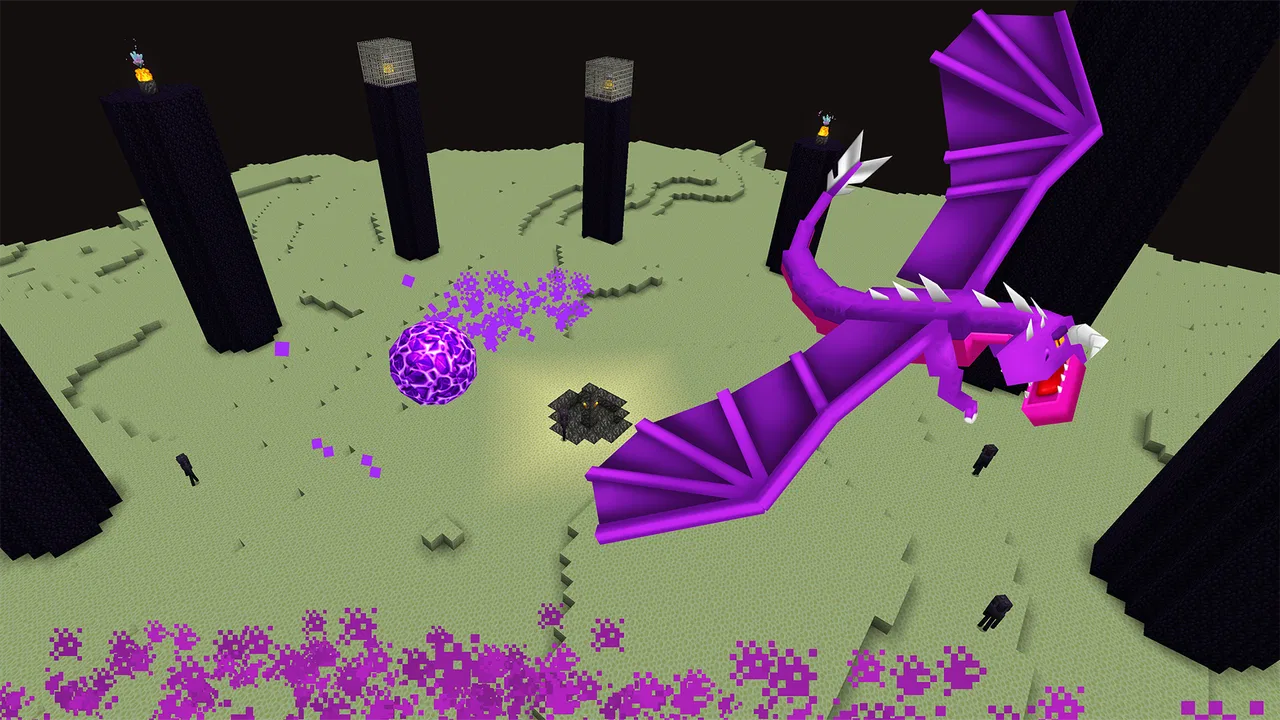
RealmCraft: Mine & Craft World is a sandbox building game available on Android and iOS. It allows players to explore a blocky 3D world, gather resources, craft tools, and build structures. It offers both creative and survival modes, making it appealing to a wide range of players who enjoy crafting and exploration.
02Is RealmCraft: Mine & Craft World free to play?
Yes, RealmCraft is free to download and play. However, it includes in-app purchases for additional content and features. These purchases can enhance gameplay by providing access to special items or removing ads. Players can still enjoy the core game without spending any money.
03What are the main features of RealmCraft: Mine & Craft World?
RealmCraft offers a variety of features including an open-world environment, creative and survival modes, multiplayer support, and a wide range of building blocks and materials. Players can also customize their characters and engage in quests, adding layers of depth and replayability to the game.
04Does RealmCraft support multiplayer gameplay?
Yes, RealmCraft includes multiplayer support, allowing players to join friends or other players online. This feature enhances the social aspect of the game, enabling collaboration on building projects and exploration. It’s a great way for players to connect and share their creative worlds.
05Are there any age restrictions for playing RealmCraft?
RealmCraft is suitable for a wide audience, but it is recommended for players aged 7 and up due to its mild cartoon violence and online interactions. Parents should be aware of the in-app purchases and supervise online play to ensure a safe gaming experience for younger players.
Pros
- Highly customizable building options.
- Offline mode available for gameplay.
- Regular updates with new features.
- Intuitive controls for easy navigation.
- Rich visual graphics enhance immersion.
Cons
- Contains in-app purchases.
- Occasional lag on older devices.
- Limited multiplayer functionality.
- Ads can be intrusive at times.
- Battery drain is noticeable during play.

RealmCraft: mine & craft world
Gallery